Trail camera specs explained
A plain-English walk through the numbers on a trail camera box: what trigger speed, recovery, detection range, IR wavelength and megapixels really tell you.
- Time
- 15 minutes
- Difficulty
- Easy
- Steps
- 8
- Checked
What you’ll need
- The spec sheet or manual for the camera you're considering
Safety first
- Battery-life and range figures are maker claims under ideal conditions. Expect less in cold weather or with lots of night-time triggers.
Step by step
-
Step 1: Trigger speed
The time from the sensor first detecting movement to the camera taking the picture. A slow trigger can give photos with only part of an animal. Photo triggers are usually slightly quicker than video triggers. As an example, a retailer lists Browning's Strike Force Pro X at 0.2 seconds.
Next: step 2 -
Step 2: Recovery time
How long the camera needs to re-arm and take the next triggered photo. Short recovery helps you catch a second animal following the first. The same Browning listing gives 0.6 seconds. Don't confuse recovery with the PIR delay setting, which is a wait you choose in the menu.
Next: step 3 -
Step 3: Detection range and detection zone
The detection zone is the area where movement can trigger the camera. The field of view is what the lens records. If the detection zone is much wider than the view, you get empty frames of animals that never stepped into shot. Range figures are best-case. Bushnell's manual links range to the sensitivity setting, quoting up to about 21 m on medium and about 12 m on low for one model.
Next: step 4
-
Step 4: PIR sensor
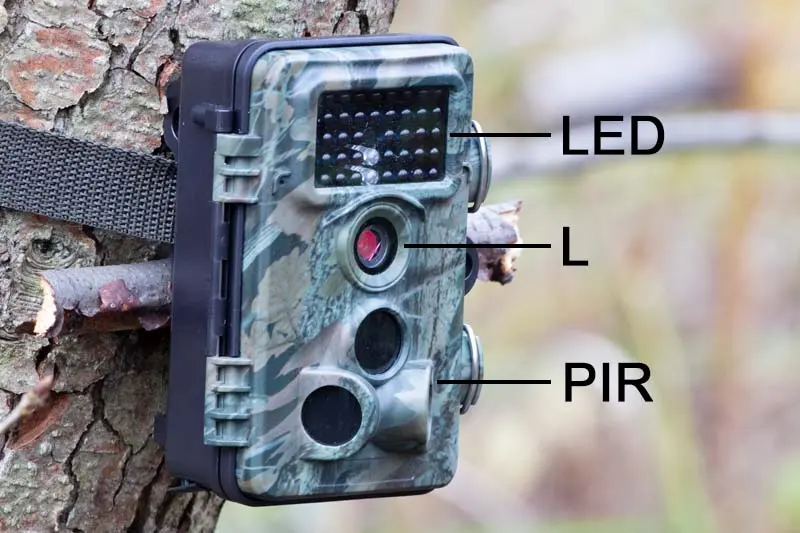
The passive infrared (PIR) sensor reacts to something warmer than the surrounding air moving through its zones. The bigger the temperature difference, the stronger the signal. Animals crossing the view are detected more reliably than those walking straight at the lens.
Next: step 5 -
Step 5: Night illumination and IR range
Look for the LED type: low glow (about 850 nm, faint red glow) or no glow (about 940 nm, invisible to people). Infrared gives black-and-white night images. Only white flash gives colour. Low glow generally has more range and better image quality. NatureSpy estimates no glow loses roughly 30% of brightness and range.
Next: step 6 -
Step 6: Megapixels: native vs interpolated
The big photo number is often interpolated, meaning software enlarges images from a smaller sensor. Trailcampro says sensors of around 4 MP are often interpolated to 24–48 MP, which inflates file size without adding detail. NatureSpy suggests a lower resolution setting can actually look better. If the manual gives the sensor's native resolution, that's the more useful figure.
Next: step 7 -
Step 7: Video resolution and frame rate
Common options are 720p, 1080p and 4K. Higher resolutions use more card space. Bushnell's manual recommends 1080p as a balance between clarity and storage. 4K also needs a faster SD card (U3/V30).
Next: step 8 -
Step 8: Power, storage and operating temperature
Check the battery count and type, any external power socket, the maximum SD card size (some cameras only take up to 32 GB) and the operating temperature range. Bushnell's Cellucore 30, for instance, is rated -20°C to 60°C. Battery-life claims are usually based on a set number of pictures a day, so treat them as a guide.
Tips
- Compare cameras on trigger speed, recovery and real sample footage first, and megapixels last.
- Field-of-view angle (for example 47° on Bushnell's Cellucore 30) tells you how wide the scene will be.
| Spec | What it tells you | What to look for |
|---|---|---|
| Trigger speed | Delay before the shot | Shorter is better for moving animals |
| Recovery time | Time to the next triggered shot | Shorter catches animals in groups |
| Detection range | How far the PIR can sense | Matched to your site, not just bigger |
| IR type | 850 nm low glow / 940 nm no glow / white flash | Low glow for range, no glow for discretion |
| Megapixels | Often interpolated | Native sensor resolution, sample images |
| Max SD card | Largest card supported | Check before buying a card |
Questions people ask
What is interpolation?
Software upscaling that makes a picture file larger than the sensor's real resolution. It adds no new detail.
Is a longer detection range always better?
No. A detection zone much wider than the field of view can give lots of empty pictures, and long range matters little in a small garden.
What's the difference between 850 nm and 940 nm?
850 nm LEDs give a faint red glow and generally better range. 940 nm LEDs are invisible to people but give less light.
Sources
Checked 18 October 2026. We wrote this guide in our own words, using:
- Trailcampro: trail camera anatomy (trailcampro.com)
- NatureSpy: basic features and settings of trail cameras (naturespy.org)
- Bushnell Cellucore 30 instruction manual (copy hosted by Adorama) (adorama.com)
- B&H listing: Browning Strike Force Pro X specifications (bhphotovideo.com)
Was this guide helpful?
Report a problem with this guide
Printed from wildlifetrailcameras.co.uk/guides/trail-camera-specs-explained/ · Checked 18 October 2026 · Research reviews, not hands-on tests: specifications come from manufacturers and findings from the independent reviewers we link to. Check the law before filming beyond your own property.